

Assignment settings Brightspace and Turnitin
In Brightspace, you can create an assignment with or without Turnitin similarity checking. It is important to know that the Brightspace settings are always leading, even when Turnitin is enabled.
Turnitin therefore functions as an additional layer on top of the Brightspace assignment, but cannot override the Brightspace settings. The way Brightspace handles submissions determines how many files Turnitin receives and which version is ultimately scanned.
Both Brightspace and Turnitin have settings related to submissions and similarity checking. These settings complement each other but do not work in the same way. It is therefore important to understand how the two layers interact.
1. Configuring Brightspace (Assignment → Submission & Completion)
The Brightspace assignment determines:
-
how many times a student may submit,
-
which submissions remain visible,
-
which files are ultimately sent to Turnitin.
These settings always apply, even if Turnitin is not enabled — and they form the basis on which Turnitin operates.
Brightspace offers three options for storing submissions:
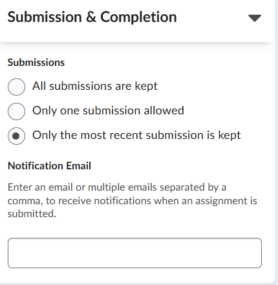
1.1 All submissions are kept
Students may resubmit as many times as they wish until the due date & time.
All uploaded versions remain visible to the instructor in Brightspace.
-
A Turnitin report is automatically generated for each submission attempt.
-
These reports are visible in the assignment view.
-
Important: multiple attempts from the same student within the same assignment are not compared to each other in Turnitin.
Students therefore do not match 100% against their own earlier version. - Turnitin stores only one document per student per assignment in its own database. Earlier attempts are always overwritten by the most recent version.
1.2 Only one submission allowed
Students may submit only once.
After this, the assignment is closed for that student.
-
Only one Turnitin report is generated.
-
The Turnitin report-timing settings have no effect here (there is only one file).
1.3 Only the most recent submission is kept
Students may resubmit until the deadline, but:
-
only the most recent attempt is stored in Brightspace;
-
earlier submissions are overwritten;
-
Turnitin therefore always receives the latest version and automatically overwrites earlier attempts.
Summary: Brightspace determines the number of attempts
-
Brightspace decides what is submitted.
-
Turnitin scans everything that Brightspace allows and transfers.
-
The Submission & Completion settings determine how many documents Turnitin receives.
2. Configuring Turnitin (Manage Turnitin → More Settings)
When Turnitin is enabled, you will see three options for generating Similarity Reports:

-
Generate reports immediately (students cannot resubmit)
-
Generate reports immediately (students can resubmit until due date): After 3 resubmissions, reports generate after 24 hours
-
Generate reports on due date (students can resubmit until due date)
Although these settings are visible, it is important to know that in the Brightspace–Turnitin V2 integration they do not influence student submission behaviour.
2.1 Why these settings do NOT work as described
The Turnitin settings were designed for direct Turnitin workflows (e.g., via Feedback Studio).
Brightspace, however, sends the files to Turnitin itself and controls:
-
how many attempts a student may submit;
-
whether resubmissions are allowed;
-
which version is stored;
-
which attempts remain visible.
Therefore, Turnitin cannot prevent students from resubmitting — even when you select:
Generate reports immediately (students cannot resubmit)
If Brightspace allows multiple attempts, students will always be able to submit again.
2.2 What Turnitin DOES do
Regardless of the Turnitin timing option selected:
-
Turnitin generates a report for every attempt Brightspace sends (as long as multiple attempts are allowed).
-
Turnitin stores only one document per student per assignment in its database.
-
Earlier attempts are overwritten in Turnitin, so only the latest version remains stored.
-
Attempts from the same student are not compared to each other in Turnitin.
This prevents a student from receiving a 100% match on their own earlier uploads.
2.3 Recommended setting
We strongly recommend leaving the Turnitin settings unchanged and using the default option:
✔️ Generate reports immediately (students cannot resubmit)
This ensures the most predictable behavior:
-
every attempt receives an immediate Similarity Report;
-
instructors can view all reports;
-
Turnitin automatically stores only the latest version.
Key points at a glance
Brightspace controls:
-
how many attempts a student may submit;
-
which attempts are stored;
-
which documents Turnitin receives.
Turnitin controls:
-
when the document is scanned;
-
which report is displayed;
-
and that only the latest version is stored.
Important:
-
Turnitin does not compare attempts from the same student within the same assignment.
-
Turnitin does compare the submissions of different students within the same assignment.
-
Brightspace settings are always leading.